
🔒D666 Withdrawal Guide – Password and Options Shown
This page explains the D666 withdrawal screens, using only what the app shows. It is an honest guide for D666 users in Pakistan. This is an independent information guide, and the app is for adults aged 18 and over.
Some withdrawal details are not visible in the screens we reviewed, so this page is careful not to guess. Always check the live app and the current rules before you withdraw.
✅ Key Takeaways
- You must set a withdrawal password before you withdraw, and keep it private.
- The Request withdrawal screen shows three options: No Wallet, Normal withdrawal, and Convert to crypto.
- The No Wallet option shows a tag “MAX 66,666.00”; what it caps is not explained on screen.
- A bonus carries a play (turnover) requirement before it can be withdrawn: 20x for the new-user bonus and 1x for the Daily Mission bonus.
- Limits, fees, timing and status labels are not shown in the screens we reviewed , check the live app.
📍Where to Find Withdraw in the App
The Profile screen shows a Withdraw button next to Deposit, plus “Manage withdrawal” and “My Records” (with the subtitle “Details, records, reports, recover balance”). The More menu also shows Withdraw, Manage withdrawal, Statement, History, Records, Report and Unclaimed.
These labels show where the withdraw feature and your records live. They do not show how each one behaves.
🔐Set Your Withdrawal Password First
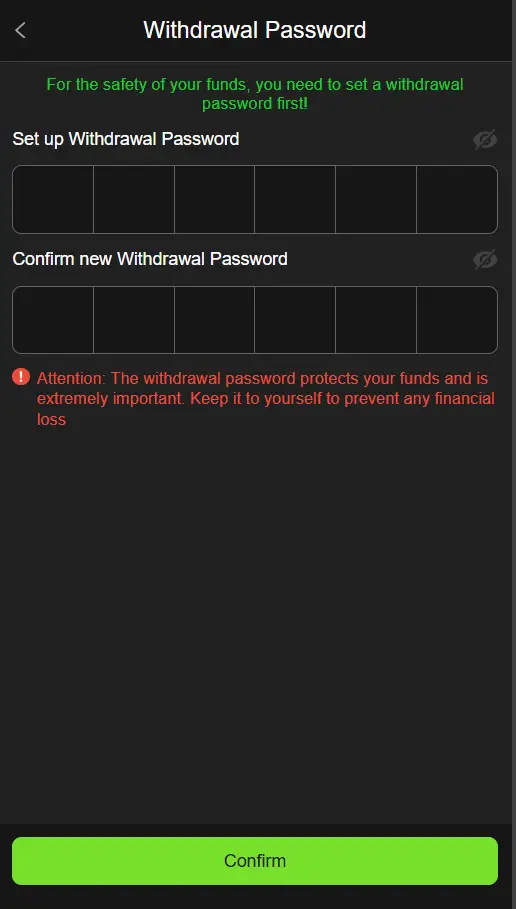
The app shows a “Withdrawal Password” screen with a green notice: “For the safety of your funds, you need to set a withdrawal password first!” It has two sets of six boxes and a red warning to keep the password private.
| Field | What it shows |
|---|---|
| Set up Withdrawal Password | Six boxes, with a show/hide eye icon |
| Confirm new Withdrawal Password | Six boxes, with a show/hide eye icon |
| Attention warning | The password protects your funds and must be kept private |
| Confirm button | Saves your withdrawal password |
An earlier version of this screen also showed a red message, “Withdrawal password cannot be empty,” when a box was left blank.
📋The Request Withdrawal Screen
The Request withdrawal screen has top tabs for “Request withdrawal” and “Receiving account,” a balance with the Pakistan flag and a refresh icon, and three options. It also shows “Already have an account – Link Now” and “Set payment password first – Configure Now.”
| Option shown | What the screen shows |
|---|---|
| No Wallet | A withdrawal option with a green tag “MAX 66,666.00” |
| Normal withdrawal | A withdrawal option shown in the list |
| Convert to crypto | A withdrawal option; its own view shows an “Add withdrawal account” row |
💠No Wallet Option
The No Wallet option shows a green tag reading “MAX 66,666.00.” The screen does not explain what this figure is the maximum of, so do not assume it is a daily or per-request limit. A promotional line about No Wallet points and prizes is also shown; check its current terms in the app.
💠Normal Withdrawal Option
“Normal withdrawal” appears as one of the three options. Its own screen and fields are not shown in the screens we reviewed, so we cannot describe how it works. Check the live app.
💠Convert to Crypto Option
The “Convert to crypto” view shows an “Add withdrawal account” row with an arrow, a “Withdrawal Amount” field in Rs with the hint “Add a withdrawal account before withdrawing,” and a “Confirm withdrawal” button that appears inactive until an account is added. Which crypto or network it uses is not shown on screen.
🏦Receiving Account and Add Withdrawal Account
The screen shows a “Receiving account” tab and, in the crypto view, an “Add withdrawal account” row. These labels are visible, but their full setup screens are not shown in the screens we reviewed. Follow the in-app prompts and double-check every detail you enter.
🪜What the Screens Show Step by Step
Based on the screens reviewed; your screen may differ.
- Open Profile or the More menu and tap Withdraw.
- If the app asks, set your withdrawal password and confirm it.
- Choose one of the visible options: No Wallet, Normal withdrawal, or Convert to crypto.
- Use “Link Now” or “Add withdrawal account” where the screen shows it.
- Enter the amount in the Rs field.
- Tap the Confirm button shown on that screen.
This page does not promise that a withdrawal will be approved, how long it takes, or that it will succeed.
📜 Play Requirements Before a Bonus Can Be Withdrawn
The rules screens say a bonus must meet a play (turnover) requirement before it can be withdrawn. For the new-user bonus this is 20x, and for the Daily Mission bonus it is 1x.
Rewards must also be claimed within the time shown, and they expire if you miss the window. Read the current Event Rules in the app, as these can change.
🏆 What the VIP Table Says About Withdrawals
The VIP table shows the same three withdrawal-related lines for every level from VIP0 to VIP15: Daily total withdrawal “Unlimited,” Daily withdrawal times “Unlimited,” and Daily fee-free orders “0 orders.” This is as shown in the VIP table at the time of review.
Treat these as on-screen labels, not promises. Check the current rules in the app.
❓What This Page Cannot Confirm
To stay accurate, here is what the screens do not show: the minimum withdrawal amount, any fees, processing time, status labels such as pending or success, rejection reasons, and any ID checks. The Normal withdrawal screen, the Receiving account screen, and the screen after you press Confirm are also not shown.
Please confirm all of these inside the live app before you rely on them.
🔧If a Withdrawal Does Not Go Through
These are general, safe steps. Re-check the details you entered and that your withdrawal account is added correctly.
Review your activity using Records, Statement or History in the app, and keep screenshots of what you see. If it still does not go through, contact Customer Service inside the app. Never share your password, withdrawal password or any code with anyone.
🛡️Withdrawal Safety Tips
Keep your withdrawal password private and separate from your login password. Be cautious if anyone asks for extra payments to “release” or “unlock” a withdrawal , ask for the written policy first.
Only use the withdrawal and account screens inside the app. Treat the app as entertainment for adults, not as a source of income.
❔Frequently Asked Questions
Do I need a withdrawal password?
Yes. The app shows a “Withdrawal Password” screen and says you must set one first, with two sets of six boxes.
What withdrawal options does the screen show?
Three options appear: No Wallet, Normal withdrawal, and Convert to crypto.
What does “MAX 66,666.00” mean?
It is a tag shown on the No Wallet option. The screen does not explain what it caps, so check the live app.
Can I withdraw a bonus right away?
No. A bonus carries a play requirement first , 20x for the new-user bonus and 1x for the Daily Mission bonus.
How long does a withdrawal take?
The screens do not show timing, fees or status labels. Check the live app.
Where can I see my withdrawal records?
The app shows Records, Statement and History in the Profile and More menus.
Are withdrawals unlimited?
The VIP table shows “Unlimited” for daily total and daily times at review time, but these are on-screen labels, so confirm current rules in the app.