💳 D666 Deposit Guide – App Payment Methods to Check
This page explains the D666 deposit screens, using only what the app actually shows. It is an easy guide for D666 users in Pakistan who want to know where Deposit is and which methods appear. This is an independent information guide, and the app is for adults aged 18 and over.
Payment methods, ranges and any bonus can change at any time. Always confirm the details inside the live app before you send any money.
✅ Key Takeaways
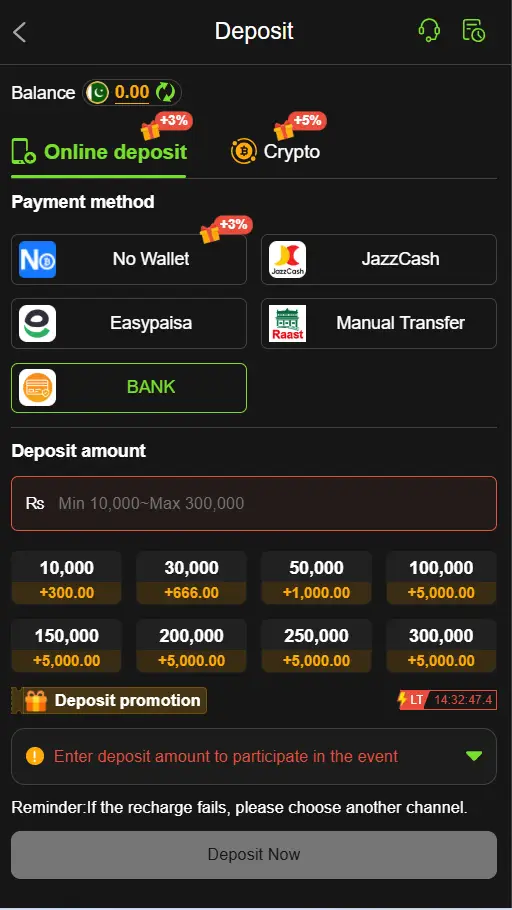
- Deposit has two tabs: “Online deposit” (+3% tag) and “Crypto” (+5% tag).
- Online methods shown include No Wallet, JazzCash, Easypaisa, Manual Transfer (Raast) and Bank.
- The Crypto tab shows USDT on TRC20, BEP20 and ERC20 networks.
- The amount range shown depends on the method and screen, so read it each time.
- Always check receiver details in the live app, keep your receipt, and only deposit what you can afford.
📍Where to Find Deposit in the App
The app shows several ways into the deposit area. There is a Deposit shortcut on the lobby (marked +5%), a Deposit button in the bottom navigation bar (marked +5%), a Deposit button on your Profile, and Deposit buttons on the VIP screen.
Any of these opens the deposit page, where you choose a tab and a method.
🧾 Online Deposit Tab
The “Online deposit” tab (marked +3%) shows your balance with a refresh icon and a list of payment methods. The table below lists only what the screen shows. The amount range and presets shown can change with the method you pick and the screen version, so read them each time.
| Method shown | What the screen shows |
|---|---|
| No Wallet (+3% tag) | A payment method with sub-options; one screen showed a range of Rs100~500000 |
| JazzCash | A payment method shown in the list |
| Easypaisa | A payment method shown in the list |
| Manual Transfer (Raast) | A payment method shown with the Raast logo |
| Bank | A bank method; one screen showed a range of Rs10,000~300,000 with preset amounts |
The screen also shows a “Wallet download” link, an “Already have an account – Link Now” option, and a “Set payment password first – Configure Now” option, plus support and history icons at the top. One screen includes a reminder that if a deposit fails, you can choose another channel.
Please note: the actual JazzCash, Easypaisa and Bank payment steps are not shown in the screens we reviewed. Follow the in-app prompts for those and confirm every detail before you pay.
🪙 Crypto Deposit Tab
The “Crypto” tab (marked +5%) shows USDT with three network choices. The table lists the ranges shown on screen.
| Network shown | Range shown |
|---|---|
| USDT-TRC20 | 1 USDT ~ 50000 |
| USDT-BEP20 | 1 USDT ~ 50000 |
| USDT-ERC20 | 20 USDT ~ 50000 |
The crypto screen also shows an amount box with a hint “Min 1~Max 50,000,” a switch button, an exchange-rate display (shown near 1:276 at review time, which changes), preset amounts such as 5, 10, 15, 30, 100, 500, 10,000 and 50,000, a “Deposit promotion” with a countdown, and a “Deposit Now” button. There is a reminder on screen that USDT-TRC20 can be bought on a trading platform before depositing. We do not recommend any specific exchange or wallet , choose your own and verify it yourself.
🔐 Payment Password: Link Now and Configure Now
The deposit screen shows two helpers. “Link Now” is for people who already have an account to link, and “Configure Now” appears next to “Set payment password first.”
The exact steps behind these are not shown on screen, so follow the in-app prompts. Keep any payment password private.
🧮 Before You Deposit
Use this quick checklist before you send money.
- Confirm the method is live for your account inside the app.
- Check the receiver details shown in the live app, not from any outside source.
- Enter the exact amount and read the range shown for that method.
- Keep your receipt and any reference number.
- Only deposit money you can afford as entertainment, never money for rent, bills, study or family.
🔄 After You Deposit: Checking Status
The deposit screen shows a balance with a refresh icon and a history icon at the top. You can use these to check your balance and look over past activity.
We cannot confirm timings, because the screens do not show how long a deposit takes. Check the live app for the current status.
❓If a Deposit Does Not Show Up
These are general, safe steps. First, re-check the amount and receiver details you used, and refresh your balance.
Keep your receipt and reference number, and use the history icon to review the activity. If it still does not appear, contact Customer Service inside the app. Never share your password, payment password or any code with anyone, including people who claim to be support.
🛡️Payment Safety Tips
Only pay from your own wallet or bank app, and confirm the receiver details in the live app each time. Be cautious if anyone asks for extra payments to “unlock” money.
Keep your passwords private and avoid making payments on public Wi-Fi. Treat deposits as spending for entertainment, within a fixed budget.
❔Frequently Asked Questions
What deposit methods does D666 show?
The Online tab shows No Wallet, JazzCash, Easypaisa, Manual Transfer (Raast) and Bank. The Crypto tab shows USDT on TRC20, BEP20 and ERC20.
What is the minimum or maximum deposit?
The range depends on the method and screen. One screen showed No Wallet at Rs100500000 and Bank at Rs10,000300,000; crypto showed Min 1~Max 50,000. Always read the range in the live app.
Can I deposit with JazzCash or Easypaisa?
They appear in the Online list. The exact payment steps are not shown in the screens we reviewed, so follow the in-app prompts and confirm receiver details.
Does the app support crypto deposits?
Yes, the Crypto tab shows USDT on three networks. The screen also reminds you that USDT-TRC20 can be bought on a trading platform first.
What do the +3% and +5% tags mean?
These tags appear on the Online and Crypto tabs. Their exact terms are not explained on screen, so check the current Event Rules in the app.
How long does a deposit take?
The screens do not show timings. Use the balance refresh and history icons and check the live app.