📝D666 Register: How to Create an Account (Step by Step)
This page explains how to D666 register, using only what the sign-up screen actually shows. It is a plain, easy guide for people in Pakistan who want to create an account on the D666 app. This is an independent information guide, and the app is for adults aged 18 and over.
App details and reward amounts can change at any time. Always check the current details inside the live app before you act on anything here.
✅ Key Takeaways
- You sign up with a Pakistan (+92) phone number or email, then set and confirm a password.
- The screen offers two methods: “Password registration” and “Code register.”
- You must tick the box that says you are over 18 and agree to the User Agreement.
- You can also bind your sign-up with No Wallet, Google, Facebook or Telegram, though the exact steps are not shown on screen.
- Keep your password private and sign up on your own device.
📋 What the Register Screen Shows
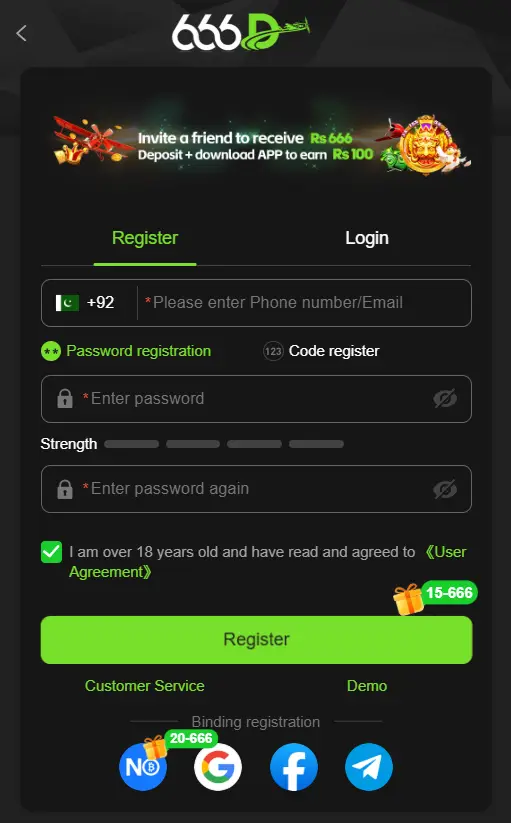
The table below lists only the items visible on the register screen.
| Field or button | What it is |
|---|---|
| +92 with Pakistan flag | Country code for your phone number |
| Please enter Phone number/Email | Where you type your phone number or email |
| Password registration | Sign up by setting a password |
| Code register | A second sign-up method shown on screen |
| Enter password (with eye icon) | Your password; the eye shows or hides it |
| Strength bar | Four segments that react to your password |
| Enter password again | Confirms your password matches |
| 18+ User Agreement checkbox | You confirm you are over 18 and agree to the terms |
| Register button | Submits your sign-up (shows a 15-666 gift badge) |
| Customer Service / Demo | Support and a demo option |
| Binding registration icons | No Wallet, Google, Facebook, Telegram |
🧾 Before You Start
Have your Pakistan phone number or email ready. Choose a strong password that you do not use for banking, email or social media.
Make sure you are 18 or older, because the sign-up requires you to confirm this. Sign up on your own phone, not a shared or public device.
🔑 How to Register With a Password
These steps match the register screen only.
- Open the app and choose the Register tab.
- Keep +92 selected and type your phone number or email.
- Choose “Password registration.”
- Type a password in the “Enter password” box; use the eye icon to check it.
- Type the same password again in “Enter password again.”
- Tick the box to confirm you are over 18 and agree to the User Agreement.
- Tap Register.
🔢 Code Register
The screen also shows a second method called “Code register” next to the password option. This is visible as a choice, but the exact flow – what the code is and how it arrives – is not shown on the screen we reviewed. Check how it works inside the live app before you rely on it.
🔗 Binding Registration Icons
Below the Register button, the screen shows a “Binding registration” row with icons for No Wallet, Google, Facebook and Telegram. These icons are visible as sign-up options, but the steps behind each one are not shown on screen. If you use one, follow the prompts carefully and never approve access you do not understand.
⚠️ Messages You May See
If you miss a field, the screen shows red messages. “Password required” appears when the password box is empty, and “Confirm password cannot be empty” appears when the second box is empty.
There is also a strength bar with four segments near the password box. It reacts as you type, which can help you choose a stronger password.
📲 After Registration
The Mission area shows a “Sign up an account” task with a reward range of Rs 15.00–666.00 and a Claim button. This figure was shown at the time of review and can change, so read the current Event Rules in the app.
The rules screens also note that new-user tasks are for first-time users, that SMS verification and payment-method binding may be needed before claiming, that rewards must be claimed by hand within the time shown, and that rewards expire. Do not treat any reward as guaranteed cash.
🛡️ Safety Tips for Your New Account
Keep your password private and never share it, a PIN or any code with anyone, including people who claim to be support. Set a separate withdrawal password later, as the app asks.
Avoid signing up on public Wi-Fi, and sign out on shared phones. Treat the app as paid entertainment for adults, not as a way to make money.
❔ Frequently Asked Questions
How do I register on D666?
Open the Register tab, enter a +92 phone number or email, set and confirm a password, tick the 18+ agreement, and tap Register.
What sign-up methods does the screen show?
Two methods are shown: “Password registration” and “Code register.” You can also bind with No Wallet, Google, Facebook or Telegram.
Does the screen send an OTP?
The screen shows “Code register” as an option, but the exact code flow is not shown, so check inside the live app.
Why do I see “Password required”?
That red message appears when the password box is empty. “Confirm password cannot be empty” appears when the second box is empty.
Do I need to be 18 to register?
Yes. The sign-up requires you to tick a box confirming you are over 18 and agree to the User Agreement.
Is there a reward for signing up?
The Mission area shows a “Sign up an account” task with a range of Rs 15.00–666.00, shown at review time and subject to change. Read the current Event Rules in the app.