🔑 D666 Login: How to Sign In to Your Account
This page explains how to complete your D666 login, using only what the sign-in screen shows. It is a short, practical guide for D666 users in Pakistan. This is an independent information guide, and the app is for adults aged 18 and over.
The app can change over time, so always check the live app for the latest behaviour.
✅ Key Takeaways
- Sign in with your registered +92 phone number or email and your password.
- The screen offers “Password Login” and “Code login.”
- A show/hide eye icon lets you check the password you typed.
- “Remember account password” should be used only on your own private phone.
- Use “Forgot Password” if you cannot sign in, and keep all codes private.
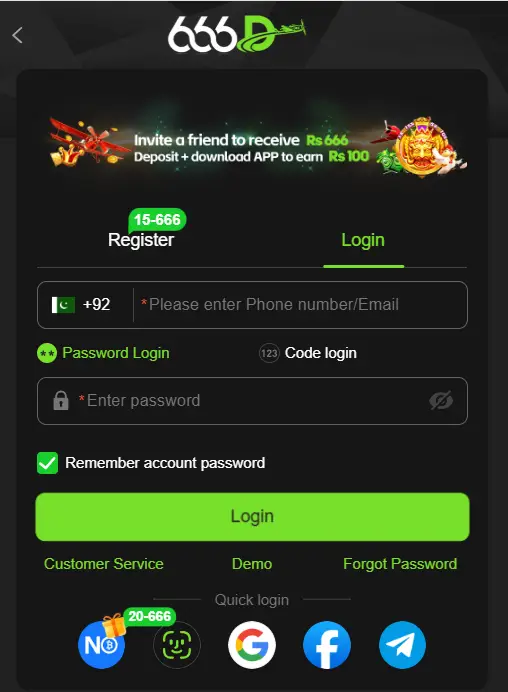
📋 What the Login Screen Shows
| Field or button | What it is |
|---|---|
| +92 with Pakistan flag | Country code for your phone number |
| Please enter Phone number/Email | Where you type your phone number or email |
| Password Login | Sign in using your password |
| Code login | A second sign-in method shown on screen |
| Enter password (with eye icon) | Your password; the eye shows or hides it |
| Remember account password | Saves your details on the device |
| Login button | Submits your sign-in |
| Customer Service / Demo | Support and a demo option |
| Forgot Password | Starts password recovery |
| Quick login icons | No Wallet, a face-scan icon, Google, Facebook, Telegram |
🔑How to Log In With a Password
- Open the app and choose the Login tab.
- Keep +92 selected and type your phone number or email.
- Choose “Password Login.”
- Type your password; tap the eye icon to check it.
- Tap Login.
🔢 Code Login
The screen also shows “Code login” next to the password option. It is visible as a choice, but the exact flow , what the code is and how it arrives , is not shown on screen. Check how it works in the live app.
💾 Remember Account Password
The screen has a “Remember account password” option that was ticked in the view we reviewed. Only use this on your own private phone that has a screen lock. On a shared or public device, leave it off and sign out when you finish.
🔁 Forgot Password
If you cannot sign in, the screen shows a “Forgot Password” link. The exact recovery steps and timing are not shown, so follow the prompts inside the app. A genuine reset should never ask you to pay or to share a code with another person.
⚡ Quick Login Icons
Under the Login button, the screen shows a “Quick login” row with icons for No Wallet, a face-scan style icon, Google, Facebook and Telegram. These are visible as options, but the steps behind each one are not shown on screen. Use only the ones you understand and trust.
🔧 Common D666 Login Problems
These are general tips, not app-specific facts. They are safe checks that help with most apps.
| Problem | General check to try |
|---|---|
| Wrong details | Re-check your phone number or email and that +92 is selected |
| Password seems wrong | Use the eye icon to see the password you typed |
| Page will not load | Check your internet and try again on a stronger connection |
| App acting up | Update or reinstall only from a source you trust |
| Still cannot sign in | Use Forgot Password, or contact Customer Service inside the app |
🛡️ Keep Your Account Safe
Never share your password, PIN or any code with anyone, including people claiming to be support. Avoid signing in on public Wi-Fi, and sign out on shared phones.
Keep a strong, unique password that you do not reuse elsewhere. If you see an unexpected login alert, treat it seriously and contact support inside the app.
❔Frequently Asked Questions
How do I log in to D666?
Open the Login tab, enter your +92 phone number or email, choose Password Login, type your password, and tap Login.
What login methods does the screen show?
Two methods: “Password Login” and “Code login,” plus quick-login icons for No Wallet, a face-scan icon, Google, Facebook and Telegram.
How does Code login work?
It is shown as an option, but the exact flow is not visible on screen, so check inside the live app.
What does “Remember account password” do?
It saves your details on the device. Use it only on your own private phone.
I forgot my password , what do I do?
Use the “Forgot Password” link on the login screen and follow the prompts in the app. Never pay or share a code to reset it.
Why can’t I log in?
Check your details, your internet, and that +92 is selected. If it still fails, use Forgot Password or contact Customer Service in the app.